
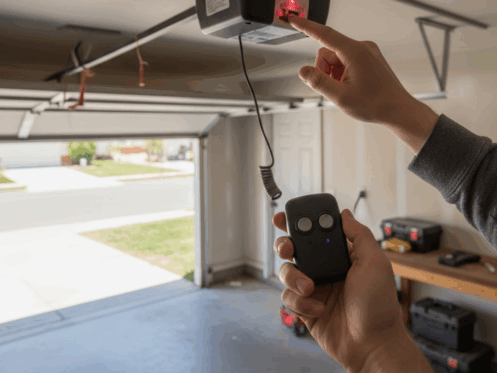
Programming an overhead garage door opener can feel confusing when you are unsure where to start, especially during setup or after replacing your remote. The good news is that most systems are designed with user friendly features that allow quick syncing and easy troubleshooting. Whether you are programming a new remote, resetting an old one, or solving a connection problem, learning the right method can help your garage door work smoothly and safely.
Understanding how overhead door remote programming works gives you the confidence to handle common issues on your own while keeping your garage secure and functional.
Overhead Door Remote Programming
Many homeowners run into problems because they are not sure where the learn button is located or how long to hold it. Others are unsure how to reset the opener when the remote stops responding. By understanding the core process, you can complete the task with ease and avoid common mistakes.
Below is a step by step approach that simplifies everything for beginners and experienced users alike.
Tools You Need Before Starting the Programming Process
Before beginning, gather the basic tools that make overhead garage door opener programming easier and safer.
- A stable ladder for easy access to the opener
- A flashlight to clearly see the learn button
- Your garage door remote and its working battery
- A small cloth to clean dust from the opener housing
Having these items ready ensures you do not interrupt the programming process or struggle to access overhead components.
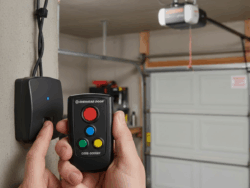
How to Locate the Learn Button on Your Overhead Garage Door Opener
Finding the learn button is often the biggest challenge for homeowners. Most openers hide this button behind a light cover or on the back panel near the antenna wire. The learn button can be yellow, purple, orange, green, or red depending on the opener model.
Here is how to locate it:
- Climb the ladder carefully and inspect the side or back of the opener motor
- Remove the light cover if needed
- Look for a small square or round button with the label Learn, Set, or Program
- Note the color, because some instructions vary slightly by color type
Once located, do not press it yet. Make sure your remote is close by so you can move to the next step without delay.
Step-by-Step Guide to Programming an Overhead Door Remote
Follow these steps to sync your overhead garage door opener with your remote:
Step 1. Prepare the remote
Hold the remote in your hand and make sure the battery is inserted correctly.
Step 2. Press the learn button
Press and release the learn button. Do not hold it down for too long, because holding it may erase all previously stored remotes. The indicator light will turn on or blink depending on the opener model.
Step 3. Press the remote button
Within 30 seconds of pressing Learn, press the button on your remote that you want linked to the opener. Hold it for one to two seconds.
Step 4. Wait for confirmation
The opener light will blink or you may hear a click sound. This indicates that the remote has been properly synced with the opener.
Step 5. Test the remote
Step back and press the remote button again. The garage door should open or close smoothly.
This process works for most overhead door legacy remote programming and modern smart based openers as well.
Troubleshooting Common Programming Issues
Sometimes the remote still does not work after following the steps. Here are common reasons and quick fixes:
- Dead Remote Battery:- Replace the battery and try programming again.
- Too Much Distance:- Stand closer to the opener when pairing the remote.
- Interference:- Nearby electronics can interrupt the signal. Turn off unnecessary devices during programming.
- Memory Full:- Older openers can store only a limited number of remotes. If your opener is full, clear the memory by holding the learn button for 10 seconds, then reprogram.
- Stuck Learn Button:- Dust or dirt can block the button. Clean it gently with a cloth.
- Wiring Problems:- If none of the remotes program correctly, the opener may have a wiring issue and may need garage door repair for a full inspection.
These solutions fix most overhead door remote programming problems without requiring professional support.
How to Reprogram or Reset an Overhead Garage Door Opener
You may need to reprogram or reset the opener if:
- You purchased a new remote
- An old remote was lost or stolen
- The opener memory malfunctioned
- You recently changed the opener battery
To reset the opener:
Step 1. Hold the learn button for 10 seconds
The light should turn off, indicating all remotes have been erased.
Step 2. Reprogram the remote
Follow the earlier programming steps to sync each remote again.
This resets the system and helps eliminate connection errors.
Safety Tips for Successful Overhead Door Remote Programming
Programming a remote is generally safe, but garage doors are heavy mechanical systems. Keep these safety guidelines in mind:
- Keep children and pets away while programming
- Do not stand under the moving garage door
- Make sure the ladder is stable before climbing
- Ensure the remote button is not triggered accidentally
- Step back before testing the opener
These precautions help prevent injuries and protect your garage door system from accidental damage.
Why Your Garage Door Won’t Open During a Power Outage
If your garage door will not open during a power outage, it has nothing to do with remote programming. The opener relies on electrical power, so it becomes inactive when electricity goes out.
The door can still be opened manually through the emergency release mechanism. If the door does not move even after using manual release, the problem may be a broken spring, damaged track, or misaligned hardware. In that case, professional garage door repair may be necessary.
Book Professionals for Garage Door Assistance
Overhead door remote programming works for most situations. However, if you:
- Cannot find the learn button
- Have a remote that will not sync after multiple attempts
- Suspect a wiring or circuit board failure
- Hear grinding noises when the door moves
It may be safer to schedule help from trained technicians. They can diagnose issues quickly and ensure your system works reliably.
For additional garage door issues beyond remote programming, you can explore garage door repair services to keep your system operating safely and smoot`hly.
FAQs
1. How to program overhead garage door opener keypad?
You need to locate the learn button, press it once, then enter your keypad code within 30 seconds. Press Enter to save the code.
2. How to reset overhead garage door opener remote?
Hold the learn button for 10 seconds to clear the memory. Then reprogram the remote from the beginning.
3. How do I sync my overhead garage door opener?
Press the learn button, press the remote button within 30 seconds, wait for confirmation, and then test the remote.